Now Available on iPhone

Your medications,
organized and
on track.

PillWheel helps you manage your full medication routine — from organizing your cabinet to tracking doses, monitoring refills, and keeping prescription records — all in one private, secure app.

Free to use · No ads · Your data stays private

Good Morning
3 doses due today
AM PM EVE NIGHT Today Mon
Pill Wheel
Metformin
500mg
Lisinopril
10mg
Atorvastatin
20mg
Next Dose
Metformin · 8:00 AM
Refill Alert
8 pills remaining
Private & Secure
iPhone App
No Ads Ever
Organization Only
Free to Get Started
Everything You Need

A complete medication
management toolkit

Every tool you need to organize your medications, stay consistent, and never lose track of your health routine.

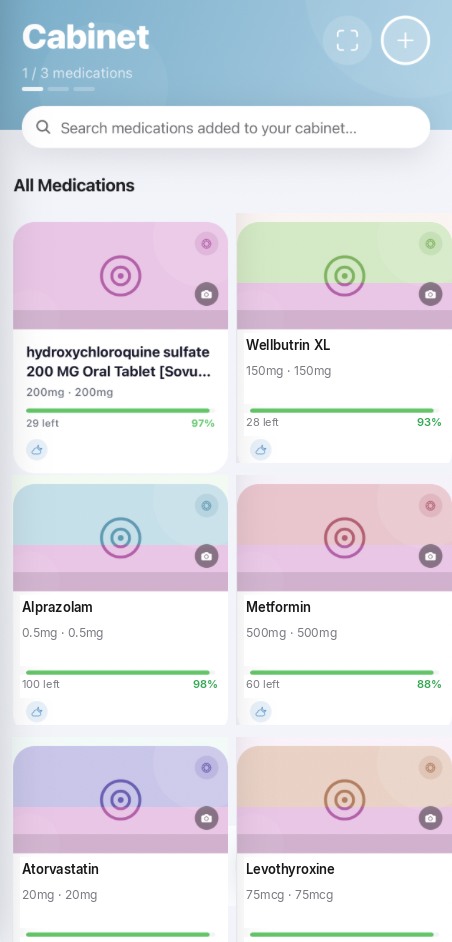
Digital Medicine Cabinet

Your complete medication inventory in one organized place — with supply levels, expiration tracking, and refill alerts.

  • Track pill counts and quantities
  • Monitor expiration dates
  • Get low-supply refill alerts
  • Organize by prescriber or pharmacy

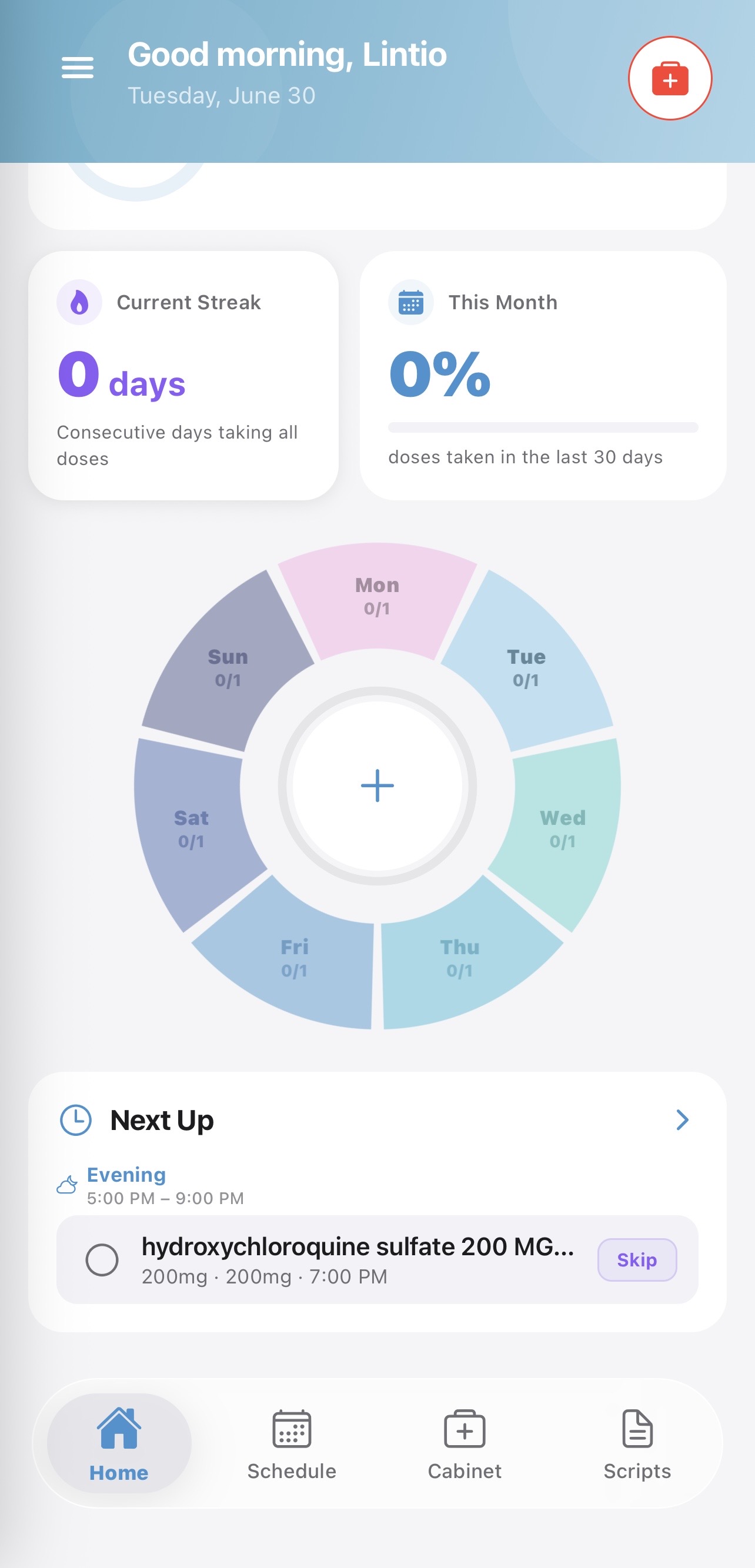
Visual Pill Wheel

An interactive wheel organized by time of day — morning, afternoon, evening, and night — makes your daily routine visual and easy to follow.

  • 7-day visual schedule
  • One-tap dose logging
  • Daily & weekly progress
  • As-needed medication support

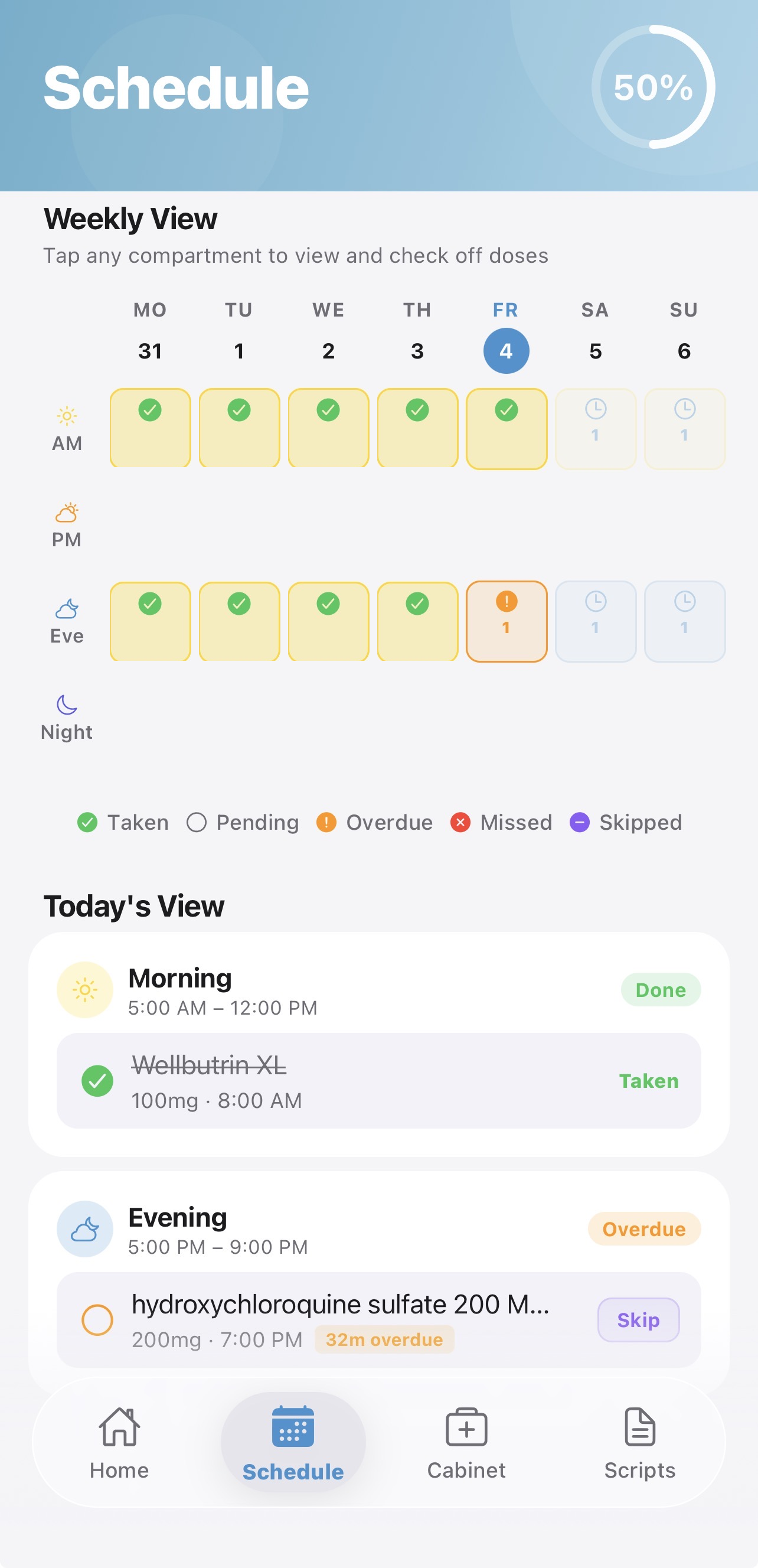
Smart Reminders

Timely notifications based on your personal schedule so you never miss a dose, even on your busiest days.

  • Multiple reminders per day
  • Refill & low-supply alerts
  • Missed dose notifications
  • Fully customizable schedule

Refill Forecasting

Know exactly when you need to call the pharmacy. PillWheel tracks your supply in real time and predicts when you'll run low.

  • Intelligent supply estimates
  • Proactive refill reminders
  • Real-time inventory tracking
  • Color-coded supply status

Bottle Label Scanner

Use your camera to quickly capture medication details from a bottle label and review them before adding to your cabinet.

  • Scan name, strength, and form
  • Review all details before saving
  • Always verify against your label
  • Faster than typing manually

Prescription Archive

Store scanned prescription documents for personal reference. View all captured images before saving, with detected medication names and strengths shown alongside clear safety disclaimers.

  • Scan & archive prescriptions
  • Detected medications shown for reference only
  • Organize by prescriber or date
  • For personal reference only — never auto-saved

Medication Information

Access educational overviews of your medications — common uses, drug class, and general information sourced from trusted medical databases.

  • Common uses & drug class
  • General side effect information
  • Sourced from RxNorm & DailyMed
  • Educational reference only

Providers & Pharmacies

Keep all your prescribers and pharmacies in one place. Link them to medications so your health team information is always at hand.

  • Manage multiple providers
  • Store pharmacy contact info
  • Link meds to prescribers
  • Phone numbers always accessible

Emergency Card

Quick access to your key medical information in an emergency. Your medications and important details accessible in just two taps.

  • Accessible in two taps
  • Current medication list
  • Key medical details
  • Always available offline
Simple & Clear

How to use PillWheel

Getting started takes minutes. Here's exactly how PillWheel fits into your daily routine.

1

Add your medications

Add medications manually by searching by name, or use the bottle label scanner to quickly capture details from your prescription bottle label. You review and confirm every detail before anything is saved.

2

Verify all medication details

Review and edit medication name, strength, form, and instructions. Always compare every field against your physical medication label and confirm details with your pharmacist before use.

3

Set a reminder schedule

Manually create a recurring reminder schedule — choose morning, afternoon, evening, or night. You control which days it repeats. No schedule is created automatically without your input.

4

Track doses on the Pill Wheel

Your daily schedule appears on the Pill Wheel, organized by time of day. Tap the circle next to a medication to mark it taken. Tap again to undo. Use Skip for intentional missed doses.

5

Monitor refills and supply

PillWheel tracks your pill count in real time and alerts you before you run out. Set a refill threshold and receive proactive notifications so you can call the pharmacy in time.

6

Archive prescriptions for reference

Scan prescription documents and review all captured images before saving. Detected medication names and strengths are shown for reference with clear disclaimers. Archived prescriptions are for personal reference only — they do not create or update medications automatically.

7

Manage providers and pharmacies

Add your prescribers and pharmacies, link them to medications, and keep contact information in one convenient place. Never search for a phone number when you need a refill.

Visual Scheduling

Never miss a dose with the Pill Wheel

The Pill Wheel is your visual daily schedule — a circular view divided into Morning, Afternoon, Evening, and Night. Your medications appear exactly where they belong throughout the day.

  • Morning, Afternoon, Evening, Night — each time of day has its own section so you always know what's due now.
  • One-tap dose logging — tap to mark taken, tap again to undo. Simple and forgiving.
  • 7-day view — see your full week at a glance and stay on top of your routine.
  • As-needed medications — add any med to the wheel for a single day without a recurring schedule.

Today's Schedule

Monday · 3 doses due

Morning Afternoon Evening Night Today Mon
Morning
1 of 1 done
Afternoon
0 of 1 due
Evening
0 of 1 due
Night
0 scheduled
Medicine Cabinet

Your complete medication inventory

The Medicine Cabinet stores all your medications in one organized view. See supply levels at a glance, get alerted before you run out, and keep prescription details right where you need them.

  • Real-time pill counts — track how many doses remain as you log your routine.
  • Expiration tracking — know which medications are approaching their expiry date.
  • Refill alerts — receive a notification when supply drops below your chosen threshold.
  • Linked to prescribers — each medication shows its prescribing doctor and pharmacy at a glance.

Medicine Cabinet

3 medications · 1 refill due

Metformin
500mg · Tablet · Morning
23 left
Lisinopril
10mg · Tablet · Evening
45 left
Atorvastatin
20mg · Capsule · Night
8 left
Atorvastatin needs a refill soon
Label Scanner & Archive

Scan labels and archive prescriptions

PillWheel includes two distinct scan features — a bottle label scanner to help you capture medication details, and a prescription archive to store prescription documents for personal reference.

  • Bottle label scan — capture medication details from a label using your camera. Review every field before saving — nothing is added automatically.
  • Prescription archive — view all captured images before saving. Detected medication names and strengths are shown in a collapsible section with clear disclaimers — for personal reference only.
  • Always verify — OCR text extraction can make errors. Always verify all details against your original prescription label or document.
  • Private by design — prescription images are stored privately and never logged or shared.

Scan features are tools for organization and reference only. Scanned data must always be verified against physical labels. PillWheel does not interpret prescriptions or provide medical advice.
Scan Label

Position label in frame

ALIGN LABEL
Name Metformin HCl
Strength 500mg
Instructions Take 1 tablet twice daily with meals
Review all details before saving
Privacy & Security

Your health data
stays yours

PillWheel is designed from the ground up to protect your private health information.

Secure Authentication

Your account is protected with secure sign-in. Medication records are tied to your authenticated account and inaccessible to others.

No Data Sales

Your health data is never sold, shared with advertisers, or used for profiling. Your information is yours and yours alone.

Private Image Storage

Prescription images are stored in private, authenticated storage. Raw prescription text is never logged or exposed in plain logs.

Offline Access

Core features including your emergency card and medication list work without an internet connection so you always have access.

Delete Your Data

You can delete your health data or your entire account at any time directly from the app. No support ticket required.

Transparent Policies

Our Privacy Policy and Terms of Service are written in plain language. No legal fine print designed to confuse you.

Important Medical Notice

PillWheel is a medication organization, reminder, and archive app. It does not provide medical advice, diagnose conditions, recommend medications, interpret prescriptions, or determine dosage schedules. All medication information stored in PillWheel is entered or reviewed by you. Always follow your original prescription label and the guidance of your pharmacist or healthcare provider. In an emergency, call 911 or your local emergency services — do not rely on this app.

Read Medical Disclaimer → Privacy Policy → Terms of Service →
FAQ

Frequently asked questions

Yes. PillWheel is free to download and use. A free account lets you add up to 3 medications and perform up to 2 label scans. A Pro subscription unlocks unlimited medications and scans.
No. PillWheel is strictly an organization and reminder tool. It does not provide medical advice, recommend dosages, interpret prescriptions, or diagnose conditions. Always consult your pharmacist or healthcare provider for medical guidance.
The scanner uses OCR (optical character recognition) to extract text from labels, which can sometimes make errors or miss information. You must always review every extracted field against your physical label before saving anything. PillWheel shows confidence levels for scanned fields to help you identify what to double-check.
Yes. Your medication data is tied to your secure account, protected by Row Level Security, and never sold or shared with advertisers. Prescription images are stored in private authenticated storage. You can delete your data or account at any time from within the app.
You can explore PillWheel in guest mode, but saving medications, prescription archives, and reminders requires a free account. Your data syncs securely across your devices when signed in.
No. Nothing is ever added automatically. Scanned bottle labels require you to review every field and confirm before saving to your cabinet. Prescription scans are saved to the archive only and do not create medications. Every medication in your cabinet must be manually reviewed and approved by you.
PillWheel includes a quick-access Emergency Card showing your current medications. However, in a medical emergency you should always call 911 or your local emergency services immediately. Do not rely solely on this app in emergency situations.
PillWheel is currently available on iPhone (iOS). Android support is planned for a future release. Sign up to be notified when it launches.

Start organizing your
medications today

Free to download. Private by design. Your routine, your way.

Available on iPhone · iOS 15 and above